
Why You Should Put Your vSeeBox on a Guest Wi-Fi Network
Find out how using a guest Wi-Fi network for your vSeeBox improves streaming performance while keeping personal devices secure.
Tom Wilmot
1/16/20262 min read
Why You Should Put Your vSeeBox on a Guest Wi-Fi Network
If you own a vSeeBox, chances are you also have a lot of other smart devices in your home — smart TVs, streaming boxes, doorbells, cameras, and voice assistants.
That’s great for convenience… but it also means your home Wi-Fi is more crowded and more exposed than ever.
Here’s a simple tip that can make your home network safer, more reliable, and easier to manage:
Put your vSeeBox (and other smart devices) on your guest Wi-Fi network.
First — What Is a Guest Network?
Most modern routers come with a guest Wi-Fi network.
It’s usually meant for visitors, but it’s also perfect for smart devices.
A guest network:
Has internet access
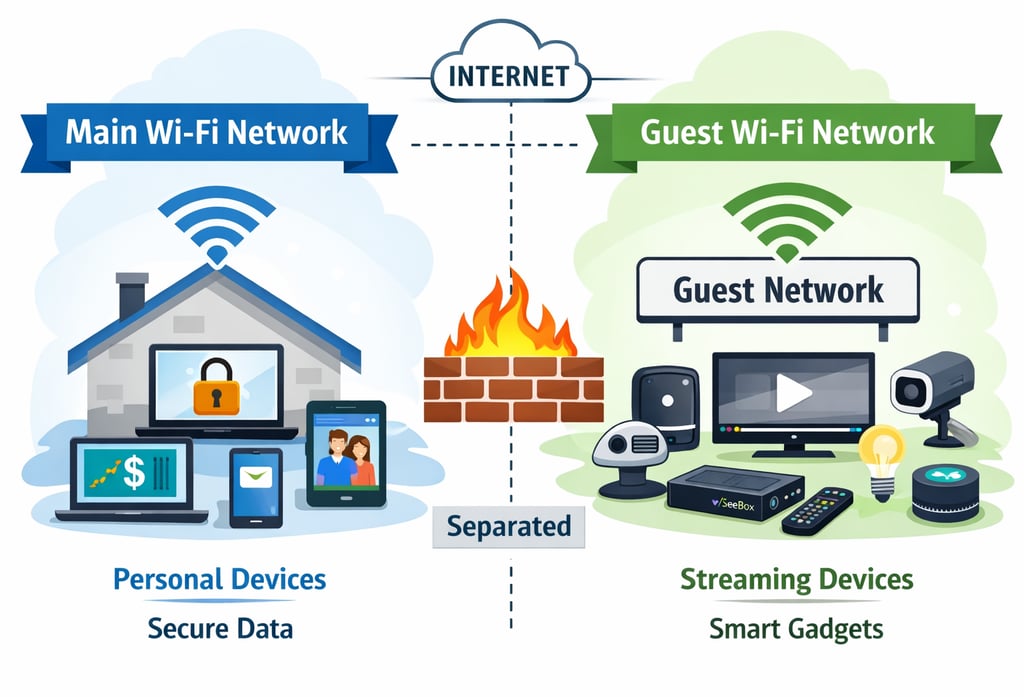
Is separated from your main devices
Keeps traffic isolated
Reduces risk if a device has issues
Think of it as a separate lane on the highway just for streaming and smart devices.
Why This Matters for vSeeBox Users
Your vSeeBox is designed to:
Stream constantly
Stay connected
Pull content from the internet
That’s exactly what it should do — but it doesn’t need access to:
Your computer
Your phone
Your work files
Your personal data
Putting your vSeeBox on the guest network keeps it focused on streaming, not sharing space with sensitive devices.
Smart Devices Are the Weakest Link
This isn’t a vSeeBox problem — it applies to all smart devices.
Many streaming and IoT devices:
Don’t receive frequent updates
Run simplified software
Are designed for ease of use, not security
Communicate with cloud services 24/7
If one smart device ever gets compromised, you don’t want it sitting on the same network as your laptop or phone.
Guest Network = Extra Protection (Without Extra Effort)
By using the guest network, you:
Prevent smart devices from seeing your computers
Limit what devices can talk to each other
Reduce the chance of problems spreading
Improve privacy
Keep personal data more secure
And the best part?
👉 Your vSeeBox still works exactly the same.
Will vSeeBox Still Stream Normally?
Yes.
vSeeBox:
Needs internet access
Does not need direct access to your phone or computer
Works perfectly on a guest network
During initial setup, you may:
Temporarily connect your phone to the same guest Wi-Fi
After setup, your phone can switch back to your main Wi-Fi.
How to Organize Your Home Wi-Fi (Simple Version)
Main Wi-Fi Network
Use for:
Phones
Laptops
Tablets
Work computers
Banking & personal devices
Guest Wi-Fi Network
Use for:
vSeeBox
Smart TVs
Streaming boxes
Smart cameras & doorbells
Alexa / Google devices
Smart plugs & lights
This setup keeps everything clean, separated, and stable.
Bonus Benefits vSeeBox Users Notice
Many people report:
Fewer Wi-Fi slowdowns
More consistent streaming
Easier troubleshooting
Less interference from other devices
When streaming devices have their own space, they tend to perform better.
Is This Overkill?
Not at all.
Modern homes often have:
20–50 connected devices
No dedicated firewall
One shared Wi-Fi network
Separating smart devices is one of the simplest and smartest things you can do — no advanced networking knowledge required.
Final Thoughts
Your vSeeBox is built to deliver entertainment — not to manage your home security.
By putting it on your guest Wi-Fi network, you:
Improve security
Protect personal devices
Keep streaming smooth
Reduce headaches
It’s a small change that makes a big difference.
HELP
Questions? Reach out anytime.
Contact
Connect
© 2026. All rights reserved.